Choosing the Right Font: Meliana for a Polished Digital Brand
I was working on a new coaching website for a wellness entrepreneur when I hit a snag. The client wanted something elegant yet approachable, something that felt personal but still professional. I had spent hours testing fonts—some too bold, some too plain—but nothing quite captured the right balance. That’s when I came across Meliana.
A Handwritten Touch with Digital Strength
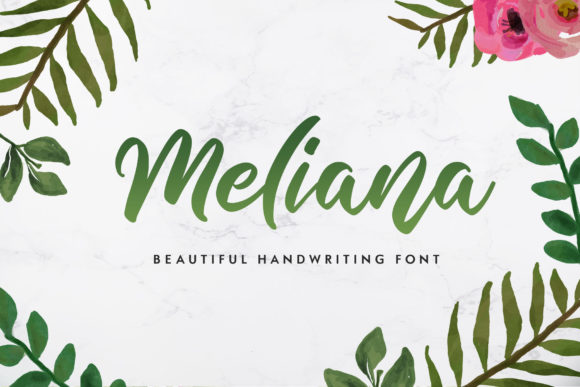
Meliana is a script font that feels like it was written by hand, with its fluid curves and subtle flourishes. It’s not just decorative—it carries a sense of warmth and sophistication that makes it perfect for a brand focused on mindfulness and self-care. Unlike many script fonts that can feel overwhelming or overly ornate, Meliana strikes a balance between elegance and readability.
I tested it in the hero section of the site, placing it over a soft gradient background. The result was striking. The font didn’t overpower the design, but it added just enough character to make the message stand out. It felt natural, almost like a handwritten note from the coach herself.
Where Meliana Shines
Meliana works best in areas where a bit of personality is needed without sacrificing clarity. I used it for the main headline, the call-to-action button, and the logo text. It also worked well as a decorative accent in the footer and social media links. However, I avoided using it for body copy, as it can be tricky to read in longer passages.
- Hero Sections: Meliana is ideal for short, impactful headlines that draw users in.
- Call-to-Action Buttons: Its elegant style adds a touch of luxury without being too flashy.
- Logo Text: It brings a unique flair to branding elements, making the brand more memorable.
- Decorative Accents: Use it sparingly in headers, footers, or social media graphics for visual interest.
Readability Matters, Especially on Mobile
One of the biggest challenges with script fonts is ensuring they remain legible on smaller screens. I made sure to test Meliana across different devices and screen sizes. On mobile, I reduced the font size slightly and increased the line spacing to maintain readability. It worked well, even when placed over image banners or dark backgrounds.
I also paid attention to contrast. When using Meliana on light backgrounds, I made sure the text color was dark enough to stand out. For dark backgrounds, I used a lighter shade of the same font to keep it readable. This small detail made a big difference in user experience.
Pairing Meliana with Other Fonts
While Meliana is versatile, it’s not meant to be used alone. I paired it with a clean sans-serif font for body copy, which helped maintain a balance between style and functionality. The contrast between the two fonts created a strong visual hierarchy, guiding users through the content naturally.
For example, I used Roboto for the body text and Meliana for headings and key phrases. This combination worked well for both desktop and mobile views, ensuring the design remained consistent across all platforms.
Font Pairing Tips for Web Design
When choosing a font pairing, consider the following:
- Contrast: A script font like Meliana pairs well with a simple sans-serif font for body copy.
- Consistency: Ensure the font family feels cohesive across all elements of the design.
- Readability: Avoid using too many decorative fonts together; stick to a maximum of two or three.
- Brand Identity: Choose fonts that align with the brand’s personality and values.
Technical Considerations for Using Meliana
Before implementing Meliana on the website, I checked several important factors:
- Webfont Availability: Meliana is available as a webfont, making it easy to integrate into any project.
- File Formats: It supports common formats like WOFF and WOFF2 for optimal performance.
- Weights and Alternates: I verified that the necessary weights and alternates were included for different design needs.
- Responsive Design: I ensured the font would scale well on different screen sizes.
- Licensing: Since the font is part of the Script Amp collection, I confirmed the commercial license was appropriate for the project.
These checks gave me confidence that Meliana would perform well in a real-world digital environment.
Final Thoughts on Meliana
Using Meliana in this coaching website project was a great decision. It added a unique visual identity while maintaining readability and professionalism. Whether you’re building a portfolio, a product landing page, or a blog, Meliana can be a powerful tool in your design toolkit. Just remember to use it wisely, pair it thoughtfully, and always prioritize user experience.